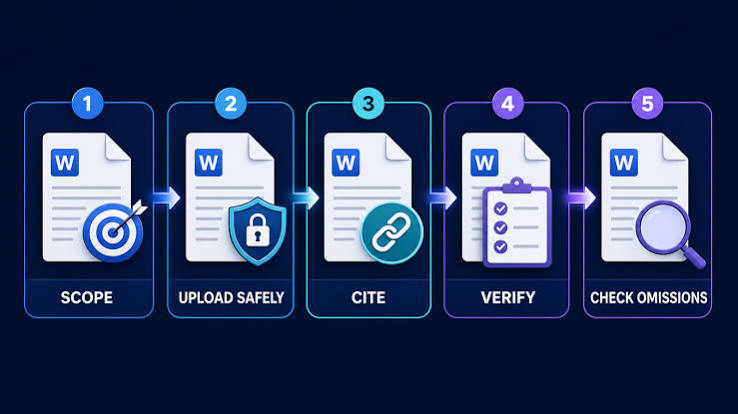
You are staring down a 120-page regulatory filing, an annual corporate earnings report, or a dense clinical research monograph at 4:30 PM on a Friday. Your leadership team needs an executive synthesis first thing Monday morning. Reading every page line by line would consume your entire weekend, yet taking careless shortcuts risks missing an obscure indemnification clause, an unannounced covenant, or an unverified methodological flaw.
Naturally, you turn to artificial intelligence. You drag and drop the PDF into an AI assistant, type “Summarize this document,” and within fifteen seconds receive four neat, beautifully structured paragraphs. The grammar is immaculate, the tone is authoritative, and the prose sounds convincing.
There is just one problem: Did the model actually capture the central arguments, or did it merely skim the surface? Worse, did it quietly hallucinate an EBITDA figure, blend two separate contractual definitions, or drop the vital caveats buried on page 92?
Using AI tools to summarize long documents is one of the highest-leverage productivity skills available today. However, treating an AI model as an unquestioned oracle is a recipe for costly mistakes. The secret to achieving 10x reading speed is not merely generating summaries; it is mastering the art of structured document ingestion and executing a fast, forensic verification audit.
In this guide, you will learn how to prepare complex documents for AI ingestion, select the right summarization architecture, deploy high-precision prompts, and systematically fact-check the output so you can rely on every single takeaway with total confidence.
Why Naive Document Summarization Fails (The Anatomy of AI Reading Errors)
To effectively supervise an AI tool, you must first understand how and why it fails when confronted with lengthy texts. Many professionals assume that because a modern language model boasts a 128,000-token or 1-million-token context window, it reads a 150-page document the same way a human analyst does. It does not.
Language models process information through statistical attention mechanisms rather than conscious comprehension. When handling massive inputs, several distinct failure modes routinely emerge:
1. The “Lost in the Middle” Phenomenon
Academic research into large language model retrieval demonstrates that AI models exhibit an attention curve resembling a U-shape. They attend heavily to the beginning of the context (the initial pages) and the end of the context (the conclusion and prompt instructions). Information nestled deep within the middle—between pages 30 and 90 of a 120-page document—often suffers from diminished attention weight. If a crucial liability cap resides in Section 14.3 in the dead center of a contract, a generic summarization prompt will frequently overlook it entirely.
2. Context Window Saturation and Silent Truncation
A model’s theoretical context window is not identical to its effective working memory. As the context fills with tens of thousands of words, the signal-to-noise ratio degrades. In extreme cases, naive document upload tools silently truncate files that exceed arbitrary internal limits without warning the user. You believe the model digested your 90-page whitepaper, but it actually stopped reading halfway through.
3. Abstractive Smoothing and Nuance Erasure
Language models naturally gravitate toward high-probability phrasing. In technical, legal, and financial writing, however, the entire operational meaning often hinges on low-probability qualifiers: “subject to prior written consent,” “excluding non-recurring restructuring charges,” or “observed only under ambient temperatures below 4°C.” When an AI produces an abstractive summary, its tendency is to smooth over these thorny conditional clauses to produce fluid prose, inadvertently stripping away the exact contingencies that matter most.
4. Hallucinatory Confabulation
When an AI model experiences an ambiguity gap, it rarely replies, “I am unsure what happened on page 78.” Instead, driven by next-token prediction, it stitches together contextually plausible fiction. It might attribute a quote to the wrong executive, invent a date, or synthesize an outcome that sounds entirely logical within the narrative flow but has zero foundation in the underlying text.
Step 1: Pre-Processing Your Document for Clean AI Parsing
An AI tool is only as reliable as the raw tokens you feed into it. Feeding a messy, poorly formatted file into an LLM guarantees an inferior, error-riddled summary. Taking five minutes to properly prepare your source material dramatically elevates the quality of your output.
Audit Optical Character Recognition (OCR) Quality
If your document is a scanned PDF (such as an executed agreement or an older academic scan), the built-in OCR layer may be corrupted. Test this immediately: highlight a sentence on the page and paste it into a plain text editor. Does it paste as legible English, or does it look like broken gibberish? If the text layer is broken or filled with misplaced line breaks, run the document through a dedicated OCR engine (such as Adobe Acrobat Pro) before passing it to your AI tool.
Strip Out Visual Clutter and Structural Noise
Long corporate reports and legal filings are packed with structural debris: recurring headers and footers, copyright notices, page numbers, boilerplate confidentiality disclaimers, and decorative cover art. While human eyes tune these out instantly, an AI model must spend valuable attention tokens parsing them across every single page. Removing unnecessary front matter, extensive glossaries, and boilerplate exhibits allows the model to concentrate its full computational budget on substantive text.
Isolate Complex Financial and Tabular Data
Standard language model parsers routinely struggle with multi-column tables. When a PDF parser converts a three-column balance sheet into linear text, it often reads across the horizontal line instead of down the columns, hopelessly scrambling the numbers. If your document relies heavily on tabular financial figures, convert those tables directly into Markdown or CSV format first. Feeding structured data directly into the prompt ensures the model interprets rows and columns with precision.
Step 2: Choosing the Right Summarization Architecture
Not all summarization workflows should use the exact same methodology. Depending on the length, density, and purpose of your document, you should deploy one of three distinct architectural strategies:
Approach A: Direct In-Context Ingestion
Modern frontier models (like Claude 3.5 Sonnet, Gemini 1.5 Pro, and GPT-4o) feature expansive context windows that comfortably hold an entire 80-page document in a single prompt. This approach is best for documents under 40,000 words that present a unified, interconnected thesis where early assumptions directly govern later conclusions.
Approach B: Hierarchical Summarization (Map-Reduce)
For massive tomes—such as a 300-page government investigation or a complex corporate merger filing—dumping the entire file into a single prompt invites cognitive dilution. Instead, adopt the Map-Reduce framework:
- Map Phase: Divide the document into logical sections or chapters. Have the AI summarize each chapter individually using a standardized extraction template.
- Reduce Phase: Take the individual chapter summaries, feed them into a fresh context window, and ask the model to synthesize the master executive summary from those modular building blocks.
This two-stage methodology ensures that every chapter receives equal analytical depth, completely bypassing the “Lost in the Middle” syndrome.
Approach C: Targeted Retrieval-Augmented Generation (RAG)
When your goal is not a generic overview but specific answers to targeted business questions, use an interrogative, citation-grounded tool like Google’s NotebookLM. Rather than asking for a blanket summary, you ask pointed questions: “What are the exact termination penalties under Section 8?” or “What was the net loss reported in the foreign subsidiary division?” The tool retrieves only the relevant passages and grounds its response directly in specific source excerpts.
Step 3: Crafting High-Precision Prompts for Actionable Summaries
The biggest mistake users make is issuing vague, open-ended commands like “Give me a summary of this report.” Ambiguous prompts yield generic, conversational fluff that is virtually useless for real decision-making.
To get professional-grade results, structure your prompt using the ROCE Framework: Role, Objective, Constraints, and Extraction Template.
Core Prompt Elements That Prevent Hallucinations
- Explicit Role Definition: Frame the model’s analytical perspective (e.g., “Act as a forensic financial auditor” or “Act as a corporate regulatory compliance officer”).
- Hard Negative Constraints: Prohibit speculation explicitly. Instruct the model: “State only facts directly supported by the text. If a detail is missing, unstated, or ambiguous, explicitly write ‘NOT SPECIFIED IN SOURCE’ rather than inferring.”
- Mandatory Attribution: Require the model to append page or section numbers to every bullet point.
- Strict Scope Boundaries: Tell the model what to ignore (e.g., “Ignore promotional brand storytelling and focus exclusively on quantitative performance metrics, supply chain risks, and capital allocation plans”).
Ready-to-Use Master Prompt Template
You are an expert executive research analyst reviewing an internal briefing document.

Your objective is to provide a comprehensive, rigorously grounded executive summary of the attached document.

Follow these strict constraints:
1. Strict Groundedness: Base your findings exclusively on the provided text. Do not draw on outside knowledge, do not extrapolate, and do not invent details.
2. Attribution: Every key claim, milestone, and figure MUST cite its exact section number or page reference (e.g., [Page 14] or [Section 3.2]).
3. Uncertainty Handling: If a topic is addressed incompletely or left ambiguous in the text, label it as "Ambiguous in Source" and explain what is missing.
4. Tone & Style: Objective, analytical, dense, and concise. Avoid promotional language, corporate jargon, and filler phrases.

Please format your analysis according to this structure:

### 1. Executive Synopsis (Max 150 words)
A dense overview defining the core thesis, the primary problem addressed, and the overarching conclusion.

### 2. Key Findings & Strategic Takeaways
- Provide 5 to 7 detailed bullet points.
- Each bullet must start with a bold category label.
- Every bullet must integrate relevant metrics, dates, or stakeholders followed by the exact source citation.

### 3. Quantitative Data & Critical Metrics
Provide a Markdown table highlighting the most significant numerical figures (financials, sample sizes, percentages, deadlines) alongside their contextual meaning and page numbers:
| Metric / Figure | Context & Meaning | Source Location |

### 4. Risks, Limitations & Unresolved Issues
List any explicit risks, stated methodological limits, financial liabilities, or operational hurdles mentioned in the document.

### 5. Actionable Next Steps
Identify all explicit recommendations, contractual deadlines, or mandated operational deliverables outlined by the author.
By enforcing a structured output format, you force the AI to parse the document systematically rather than defaulting to lazy, broad-brush generalities.
Step 4: The 5-Point Verification Audit: How to Fact-Check AI Summaries
Never copy an AI summary into an email, executive memo, or client presentation without verifying it. You do not need to read the entire original document to verify the summary; instead, apply an editorial forensic spot-check. This five-step audit takes less than ten minutes and catches over 95% of model errors.
1. The Direct Citation Trace
If you implemented the prompt requirement for page citations, test them immediately. Randomly pick three to five page references from different sections of the summary. Open the source PDF, hit Ctrl+G (or Cmd+Option+G), and navigate directly to those pages. Does the cited paragraph actually support the summary’s claim? Did the AI conflate a projected forecast with an actual historical result? If the first three spot-checks are verbatim accurate, your confidence rises significantly. If two out of three are mismatched or fabricated, reject the summary and re-prompt.
2. The Metric & Entity Ctrl+F Test
Numbers are the most vulnerable element in any automated summary. Language models frequently swap dates, confuse currency denominations ($10 million vs. €10 million), or mix up comparative baseline years.
- Extract every specific figure from the summary: revenue figures, growth percentages, headcounts, interest rates, and milestone dates.
- Open your original document and use the search bar (
Ctrl+F) to find each exact number. - Verify the surrounding context. For example, if the summary says “Operating expenses rose by 14%,” verify whether that 14% applied to total operating expenses or merely a single sub-category like marketing overhead.
3. The Semantic Boundary and Qualifier Inspection
Scan the summary for definitive words: “all,” “never,” “guaranteed,” “proved,” or “will.” Now look at the original source passage. Did the original author write “We will achieve compliance by Q4” or did they write “We anticipate achieving compliance by Q4, subject to third-party vendor audits”? AI models systematically drop conditions and caveats. If you spot definitive assertions in the summary, restore the author’s original caveats before sharing the brief with stakeholders.
4. The Adversarial Red-Team Check
Use the model against itself. Open a completely fresh conversation window (to eliminate previous context bias), upload the original document alongside the summary you just generated, and run an adversarial verification prompt:
“Below is an original document and a draft summary prepared by a research assistant. Act as a ruthless fact-checker. Compare the draft summary against the original text. Identify any: (1) factual inaccuracies, (2) omitted vital conditions or caveats, (3) exaggerated claims, and (4) misattributed quotes or metrics. If a statement in the summary is misleading, explain why and provide the exact quote from the document that refutes it.”
Because language models excel at critical comparison when freed from the task of original generation, this second pass routinely uncovers subtle hallucinations that slipped through the initial drafting stage.
5. The Counter-Factual and Negative Proof Probe
Hallucinations often take the form of the AI adding logical-sounding ideas that were never mentioned in the text. To flush these out, ask the model:
“List three plausible initiatives or outcomes related to this subject that are completely ABSENT from this document.”
If the model points out topics that were genuinely not discussed, it confirms that it has mapped the boundary between what is inside the document and what is outside general world knowledge.
Step 5: Tailoring Summarization Across Different Document Types
Every document category carries its own specialized vocabulary, structural conventions, and operational hazards. Tailor your focus to the document’s specific genre.
Legal Contracts, Master Services Agreements (MSAs), and NDAs
- Where the Risk Hides: Indemnification clauses, limitation of liability, intellectual property assignments, unilateral termination rights, and non-solicitation covenants.
- Strategic Focus: Instruct the AI to build a comparative rights matrix. Never ask for a general summary; demand an itemized breakdown of obligations, operational triggers, and financial liabilities.
- Verification Rule: Verify every single monetary threshold and notice deadline against the primary agreement and any appended exhibits or schedules.
Financial Filings, Annual Reports, and Earnings Calls
- Where the Risk Hides: Footnotes to financial statements, non-GAAP reconciliations, revenue recognition timing changes, and MD&A (Management’s Discussion & Analysis) risk disclosures.
- Strategic Focus: Instruct the AI to explicitly highlight differences between GAAP and non-GAAP figures and isolate recurring cash flow versus one-time asset sales.
- Verification Rule: Cross-check reported earnings against the consolidated statement of cash flows. Pay special attention to whether adjustments reflect real operating performance or accounting maneuvers.
Academic Research Papers and Clinical Monographs
- Where the Risk Hides: Overstating correlation as causation, unrepresentative sample sizes, lack of statistical power, and p-hacking.
- Strategic Focus: Prompt the AI to isolate the methodology section: “What was the exact sample size ($n$)? What were the inclusion and exclusion criteria? What were the primary endpoints versus secondary endpoints? Did the authors state any conflicts of interest?”
- Verification Rule: Verify whether the conclusion in the summary reflects the primary outcome metric or an exploratory secondary finding highlighted by the study authors.
Standard Operating Procedures (SOPs) and Engineering Specs
- Where the Risk Hides: Step sequence integrity, safety hazards, prerequisite toolings, and system dependencies.
- Strategic Focus: Require chronological procedural mapping. Use prompts that enforce: “State each step in strict sequential order. Highlight any mandatory safety warnings or prerequisite system checks before each action.”
- Verification Rule: Walk through the generated steps logically. If a prerequisite step is skipped or inverted by the AI, it could cause physical damage or system outages in production.
Best AI Tools for Document Summarization: Strengths, Trade-Offs, and Use Cases
Selecting the right tool for your specific workflow ensures you do not waste hours fighting platform limitations. Here is an honest, practical comparison of leading options:
1. NotebookLM (Google)
- Primary Strength: Purpose-built for grounded document synthesis. NotebookLM operates strictly on the sources you upload, virtually eliminating external web hallucinations. Its standout feature is native source-grounded citations: clicking any footnote instantly opens the exact page and highlights the source passage in the reader pane.
- Best Use Case: Students, researchers, and analysts analyzing up to 50 interrelated PDFs, transcripts, and notes.
- Limitation: Not designed for complex creative rewrites or automated programmatic workflows via API.
2. Claude 3.5 Sonnet / Claude 3 Opus (Anthropic)
- Primary Strength: Widely regarded as the industry benchmark for deep nuance, complex legal analysis, and sophisticated prose. Its large 200,000-token context window handles long, convoluted arguments without losing structural coherence.
- Best Use Case: Legal contract review, policy whitepapers, long-form academic analysis, and complex investigative journalism.
- Limitation: Strict rate limits on heavy document uploads on standard tiers.
3. ChatGPT Plus / Team (OpenAI – GPT-4o & Canvas)
- Primary Strength: Versatility and advanced data analysis. The built-in Python sandbox allows the model to write code to extract tables, parse messy text, and calculate averages directly from uploaded CSVs and spreadsheets.
- Best Use Case: Financial spreadsheets, quantitative reports, and interactive collaborative editing using the Canvas interface.
- Limitation: Standard chat interface can occasionally over-summarize and produce concise, conversational outputs rather than dense analytical briefs unless strictly prompted.
4. Local Open-Source Models (Ollama with Llama 3.3 or Qwen 2.5)
- Primary Strength: 100% data sovereignty and air-gapped security. Zero bytes leave your local hardware, making it compliant with strict corporate confidentiality policies, NDAs, and HIPAA guidelines.
- Best Use Case: Confidential mergers and acquisitions, proprietary codebases, trade secrets, and protected healthcare records.
- Limitation: Requires powerful local GPU hardware (Apple Silicon with unified memory or dedicated Nvidia RTX GPUs) and typically features shorter effective context windows than multi-billion-parameter cloud APIs.
Data Security and Privacy: Handling Confidential Documents Safely
Before dragging an internal corporate memo or patient chart into an AI tool, step back and evaluate your organization’s compliance obligations. Convenience must never compromise confidentiality.
Understand the Distinction Between Consumer and Enterprise Tiers
On free or basic consumer tiers of popular AI tools, user inputs and uploaded files may be retained and utilized to train future foundational models unless you explicitly opt out. If you paste proprietary financial projections or customer lists into a consumer chat window, you may be violating client NDAs or company data security protocols.
- Enterprise and Team Subscriptions: Generally feature contractual zero-data-retention (ZDR) agreements and explicit guarantees that customer data will not be used for model training.
- Direct API Access: Most major providers maintain strict enterprise privacy terms where payloads are processed transiently and deleted within 30 days or retained solely for abuse monitoring.
Practice Sensible Document Redaction
When using cloud-based AI tools for sensitive workflows, sanitize your documents prior to ingestion:
- Strip out Personally Identifiable Information (PII) such as Social Security numbers, dates of birth, home addresses, and phone numbers.
- Replace client names, vendor identifiers, or sensitive project codenames with neutral variables (e.g., replace “Project Titan / Acme Corp” with “Project Alpha / Target Company”).
- Remove internal network paths, IP addresses, and database connection strings from technical architecture diagrams.
Frequently Asked Questions (FAQ)
What is the maximum document length an AI tool can reliably summarize?
While modern models boast context windows spanning from 128,000 to over 1,000,000 tokens (roughly 100,000 to 750,000 words), retrieval accuracy consistently degrades as context length increases. For documents exceeding 50,000 words (approximately 100 single-spaced pages), relying on a single prompt often introduces attention blind spots. For documents longer than 100 pages, the most reliable practice is the Hierarchical (Map-Reduce) technique: summarize individual chapters or sections first, then synthesize those sectional summaries into a master document.
How do I stop AI tools from generating superficial, fluffy summaries?
Superficial summaries are almost always caused by ambiguous prompts. When an AI receives a generic request like “Summarize this,” it defaults to conversational brevity. To force depth, provide an explicit extraction template (such as the ROCE framework), require direct page citations for every point, assign a domain-specific persona (e.g., forensic accountant, patent attorney), and set explicit length minimums or category breakdowns (e.g., “Provide at least 5 distinct bullet points covering operational bottlenecks”).
Can I legally and professionally rely on an AI summary for business decisions?
No professional should base a legal, financial, medical, or contractual commitment solely on an unchecked AI summary. Language models are probabilistic reasoning engines, not deterministic verification systems. The proper workflow is to use AI as an editorial assistant that identifies relevant sections, extracts data points, and highlights potential risks—and then use the five-point verification audit to personally confirm those specific findings in the primary source before making binding commitments.
Why does an AI tool summarize the first and last parts of my PDF while ignoring the middle?
This occurs because of the well-documented “Lost in the Middle” phenomenon in transformer neural networks. Self-attention mechanisms naturally place greater weight on the initial prompt framing and the most recent tokens at the end of the context. To combat this, you can split dense documents into smaller modules, place your instructions and formatting requirements at both the very top and very bottom of the prompt, or use retrieval-based tools like NotebookLM that search across the entire document corpus uniformly.
How do I handle scanned PDFs that AI tools cannot read?
Scanned PDFs are merely image wrappers containing pictures of text rather than extractable digital characters. If your AI tool produces gibberish or claims the file is blank, the document lacks an active OCR (Optical Character Recognition) layer. Run the file through an OCR tool such as Adobe Acrobat, Apple Preview, or an open-source tool like Tesseract before uploading it. Once you can click, highlight, and copy individual sentences with your cursor, the AI will be able to ingest and summarize the text without friction.
The Human-in-the-Loop Advantage
The rise of generative artificial intelligence does not eliminate the need for critical human judgment; it amplifies it. When used carelessly, AI document summarization creates an illusion of competence—a slick, fluent veneer of understanding that can mask catastrophic omissions and subtle factual errors.
When used methodically, however, AI tools transform you from an overwhelmed, time-starved reader into a high-leverage strategic auditor. By pre-processing your documents, deploying structured prompt frameworks, and applying a disciplined five-minute verification audit, you can cut your reading and research time by 80% while dramatically increasing your analytical precision. Let the machine do the heavy lifting of extraction and structural synthesis, but always keep your human eyes firmly on the evidence.